lunes, 8 de junio de 2020

Cómo Recuperar Conversaciones Y Datos Borrados De WhatsApp

¿Quieres recuperar conversaciones, archivos, fotos, vídeos y demás, borrados de WhatsApp? en el artículo de hoy, queremos explicar paso a paso y con ayuda de un excelente software, como recuperar toda la información que por error haya eliminado de su App de WhatsApp aunque no tengas activada la copia de seguridad.
Este programa lo hemos probado en 3 teléfonos diferentes y hasta el momento ha tenido buena acogida, pero es importante aclarar que no todos tienen la misma suerte y terminen por recuperar cero archivos. Pero la idea es que hagan bien los pasos explicados por la misma fuente creadora del software para evitar no cumplir sus expectativas y poder recuperar todo lo que deseas en pocos segundos.
https://www.dominatupc.com.co/
Todo este procedimiento lo vamos hacer en pocos pasos muy sencillos, ya que la interfaz del programa es realmente simple y sin pérdida alguna. Para ello solo basta por elegir la opción según lo que hayamos perdido y necesitemos recuperar con prioridad, entre ellas poder librar fotos y datos o simplemente recuperar todo.

Procedimiento en solo 4 pasos

  1. Descargar software dando clic aquí "Android - iOS" ( Instalar)
  2. Conecta tu dispositivo al ordenador
  3. Activa la depuración de USB en tu teléfono Android
  4. En la interfaz del programa elige los tipos de archivos que desea analizar
  5. Haz clic en "Recuperar" y luego guardar los archivos perdidos en tu PC
Y ya lo tienes, simple verdad? Funciona perfectamente, es realmente una aplicación apropiada para cualquier persona que quiera recuperar su información borrada de tu dispositivo y lo mejor de todo es que no es necesario se usuario Root para poder cumplir el objetivo.

Tenorshare, además cuenta con varias funciones que puedes ir descubriendo cuando estés en la página oficial. Son muchas las herramientas y posibilidades que nos brinda para un mejor desempeño a nuestro sistema operativo móvil, tales como, desbloqueo de contraseñas, gestión de archivos, reparación de sistema y recuperación de datos. Cada una de esta selección cuenta con alternativas muy útiles que podemos dejar pendiente para cuando las necesitemos.

https://www.dominatupc.com.co/
Funciona con normalidad para dispositivos Android e iOS y con las nuevas tecnologías de recuperación de datos aplicadas, este software es capaz de restablecer tus datos en muy poco tiempo, ya sea mensajes, fotos, vídeos, etc...
Si te sirve el procedimiento es importante que nos cuente si pudo recuperar lo deseado, estaremos atentos a cualquier duda para poder resolver en caso de tener solución a lo que se requiera. No olvides compartir y seguirnos en las diferentes redes sociales. También te puede interesar:(Cómo recuperar datos de manera segura)


Continue reading

Deepin Or UbuntuDDE

I'm sure nowadays many Deepin users are thinking in changing to UbuntuDDE, so let's explain some differences between both Linux distros.


1. Community

At least in the main telegram channel Deepin has more than 2.000 users, but UbuntuDDE is new in beta version and have about 500 users.

    2. Boot

Despite de booting sound is the same in both distros, Deepin's animation is nicer than ubuntu's which uses a too bright background.


    3. Default memory and CPU usage

The CPU usage is similar, but Deepin by default is using more processes, more network connections and more drivers than UbuntuDDE.


  4.  Workspaces

UbuntuDDE allows up to 7 workspaces meanwhile Deepin right now only allows 4.
Is not only more workspaces for UbuntuDDE, it's also the more eficient way to display them.


    5.  Software Versions

Deepin is based on Debian so the program versions on store and apt are old but stable, and can have problems with the old libraries installed on the system when compiling new software.

We can see below that Ubuntu's compiler version is quite new, the 9.3.0 which is quite well, but Deepin's version is 6.3.0.


Regarding the kernels, UbuntuDDE has the 5.4.0.21 and Deepin the 4.15.0-30, the libc in both systems is updated.


    6.  The store

Deepin's store is fast and polished and contain the main software, but and the UbuntuDDE


   Conclussions

Deepin is the most used of both and it's the original one, but many users are trying the UbuntuDDE (which is beta for now) because the need of using recent versions, also the 4 workspaces on Deepin is another limitation for some Linux users. Probably Deepin v20 will overcome the limitations but the main decision is between Debian as base system or ubuntu, and for more users the trend in workstations is ubuntu.


   Gallery


Continue reading


Setting Up A Burp Development Environment

This quick blog post will document getting started with developing Burp extensions using java. Burp provides interfaces for developers to hook into the Burp application and extend the application or integrate with other tools, this interface is documented on the following site - http://portswigger.net/burp/extender/

For this guide you will need the following items:


After downloading and opening up Eclipse you will need to create a new java project. This can be done by clicking "File->New Java Project". Fill in a project name and click finish.

Once the project has been created you will need to create a new package called "burp". This can be done by right clicking the "src" folder under your new project and selecting "New->Package". When the dialog comes up set the "Name" as "burp":

You should now have a package named "burp" under the source folder in the right pane. Now you will need to import the Burp extender classes into your project. Download all of the extender classes to a local folder, once this is done right click on the "burp" package in your project and select "Import". On the dialog window that comes up select "General->File System" and hit "next":

On the next dialog you will need to navigate to where you downloaded the Burp extender classes to. Once you have done this you should see the classes, click on the folder to select all items and click "Finish":

Next we can add the Burp application into the project. To do this click on "Project->Properties" on the top toolbar. When the dialog opens select "Java Build Path" and then the "Libraries" tab. On this dialog click "Add External JARs..."
Navigate to where ever you have Burp downloaded to and select it. After you have done this click "OK" to dismiss the dialog. You are now ready to build your own Burp extensions. You can test your environment by creating a new class in the burp package named "BurpExtender". Right click the "burp" package and click "New->Class". On the dialog that comes up enter "BurpExtender" and click "Finish":

In the "BurpExtender" class you can enter the following:


package burp;


public class BurpExtender
{
    public void registerExtenderCallbacks(IBurpExtenderCallbacks callbacks)
    {
        callbacks.registerMenuItem("Hello World.", new CustomMenuItem());
    }
}


class CustomMenuItem implements IMenuItemHandler
{
    public void menuItemClicked(String menuItemCaption, IHttpRequestResponse[] messageInfo)
    {
        try
        {
            System.out.println("Hello From Burp!");
            System.out.println("Request Item Details");
            System.out.println("Host: " + messageInfo[0].getHost());
            System.out.println("URL: " + messageInfo[0].getUrl());


        }
        catch (Exception e)
        {
            e.printStackTrace();
        }
    }
}


After adding the content to your "BurpExtender" class you are ready to run the project for the first time. Click on "Run->Run" from the menu. You should see the following dialog asking how it should run your project:
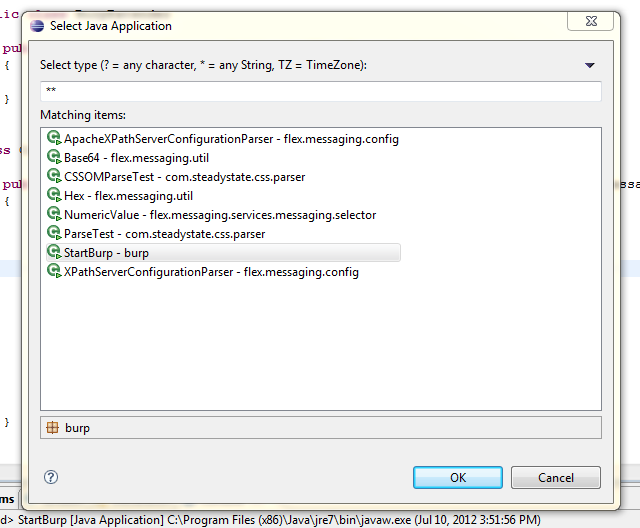
Select "Java Application" and click "Ok". Next you should receive a dialog asking which application you want to run. Select "StartBurp - burp" and click "Ok":

You should now see the burp application running. Intercept a request in the application and right click on the request, you should now see an item in the menu named "Hello World."

When you click the "Hello World." menu button you should see some information about the request in your eclipse console window:

That's it, you now have setup your working development environment for building your own Burp extensions. The javadocs for the Burp Extender interfaces are available on the Extender web page:


Related posts


  1. Hacker Wifi Password
  2. Pentest Owasp Top 10
  3. Pentest Xss
  4. Hacking Page
  5. Pentest Owasp Top 10
  6. Hacker
  7. Hacking Jacket
  8. Hacker Language
  9. Pentest Ubuntu
  10. Hacking Tutorials
  11. Pentest Linux
  12. Hacker Prank
  13. Pentest Firewall
  14. Pentest Example Report
  15. Hacking Programs

Jshole - A JavaScript Components Vulnrability Scanner, Based On RetireJS


A JavaScript components vulnrability scanner, based on RetireJS.

Why use JShole instead of RetireJS?
By default, RetireJS only searches one page, but JShole tries to crawl all pages.

How it works?

Get Started

Requirements
  • requests

Install
  • git clone https://github.com/callforpapers-source/jshole.git
  • cd jshole
  • pip3 install -r requirements
  • python3 jshole.py
usage: jshole [-h] -u URL [-d] [-l LIMIT] [-t THREAT]
optional arguments:
-h, --help show this help message and exit
-u URL, --url URL url string
-d, --debug Web Scrap debugger(default=false)
-l LIMIT, --limit LIMIT
Search Depth limit(default=1)
-t THREAT, --threat THREAT
The number of links that open per round


via KitPloit

Related news


domingo, 7 de junio de 2020

One Reason Why InfoSec Sucked In The Past 20 Years - The "Security Tips" Myth

From time to time, I get disappointed how much effort and money is put into securing computers, networks, mobile phones, ... and yet in 2016 here we are, where not much has changed on the defensive side. There are many things I personally blame for this situation, and one of them is the security tips.

The goal of these security tips is that if the average user follows these easy to remember rules, their computer will be safe. Unfortunately, by the time people integrate these rules into their daily life, these rules either become outdated, or these rules were so oversimplified that it was never true in the first place. Some of these security tips might sound ridiculous to people in InfoSec nowadays, but this is exactly what people still remember because we told them so for years.

PDF is safe to open

This is an oldie. I think this started at the time of macro viruses. Still, people think opening a PDF from an untrusted source is safer than opening a Word file. For details why this is not true, check: https://www.cvedetails.com/vulnerability-list/vendor_id-53/product_id-497/Adobe-Acrobat-Reader.html
On an unrelated note, people still believe PDF is integrity protected because the content cannot be changed (compared to a Word document).
Image stolen from Kaspersky

Java is secure

One of the best ones. Oracle started marketing Java as a safe language, where buffer overflows, format strings and pointer-based vulnerabilities are gone. Unfortunately, they forgot to tell the world that instead of "unsafe programs developed by others" they installed their unsafe program on 3 billion devices. 

Stay away from rogue websites and you will be safe

This is a very common belief I hear from average people. "I only visit some trusted news sites and social media, I never visit those shady sites." I have some bad news. At the time of malvertising and infected websites, you don't have to visit those shady sites anymore to get infected.

Don't use open WiFi

I have a very long explanation of why this makes no sense, see here. Actually, the whole recommendation makes no sense as people will connect to public WiFis, no matter what we (InfoSec) recommend.

The password policy nightmare

Actually, this topic has been covered by myself in two blog posts, see here and here. Long story short: use a password manager and 2-factor authentication wherever possible. Let the password manager choose the password for you. And last but not least, corporate password policy sux.

Sites with a padlock are safe

We tell people for years that the communication with HTTPS sites are safe, and you can be sure it is HTTPS by finding a randomly changing padlock icon somewhere next to the URL. What people hear is that sites with padlocks are safe. Whatever that means. The same goes for WiFi - a network with a padlock is safe.

Use Linux, it is free from malware

For years people told to Windows users that only if they would use Linux they won't have so much malware. Thanks to Android, now everyone in the world can enjoy malware on his/her Linux machine.

OSX is free from malware

It is true that there is significantly less malware on OSX than on Windows, but this is an "economical" question rather than a "security" one. The more people use OSX, the better target it will become. Some people even believe they are safe from phishing because they are using a Mac!

Updated AV + firewall makes me 100% safe

There is no such thing as 100% safe, and unfortunately, nowadays most malware is written for PROFIT, which means it can bypass these basic protections for days (or weeks, months, years). The more proactive protection is built into the product, the better!

How to backup data

Although this is one of the most important security tips which is not followed by people, my problem here is not the backup data advise, but how we as a community failed to provide easy to use ways to do that. Now that crypto-ransomware is a real threat to every Windows (and some OSX) users, even those people who have backups on their NAS can find their backups lost. The only hope is that at least OSX has Time Machine which is not targeted yet, and the only backup solution which really works.
The worst part is that we even created NAS devices which can be infected via worms ...

Disconnect your computer from the Internet when not used

There is no need to comment on this. Whoever recommends things like that, clearly has a problem.

Use (free) VPN to protect your anonimity

First of all. There is no such thing as free service. If it is free, you are the service. On another hand, a non-free VPN can introduce new vulnerablities, and they won't protect your anonymity. It replaces one ISP with another (your VPN provider). Even TOR cannot guarantee anonymity by itself, and VPNs are much worse.

The corporate "security tips" myth

"Luckily" these toxic security tips have infected the enterprise environment as well, not just the home users.

Use robots.txt to hide secret information on public websites

It is 2016 and somehow web developers still believe in this nonsense. And this is why this is usually the first to check on a website for penetration testers or attackers.

My password policy is safer than ever

As previously discussed, passwords are bad. Very bad. And they will stick with us for decades ...

Use WAF, IDS, IPS, Nextgen APT detection hibber-gibber and you will be safe

Companies should invest more in people and less into magic blinking devices.

Instead of shipping computers with bloatware, ship computers with exploit protection software
Teach people how to use a password safe
Teach people how to use 2FA
Teach people how to use common-sense

Conclusion

Computer security is complex, hard and the risks change every year. Is this our fault? Probably. But these kinds of security tips won't help us save the world. 

More articles


  1. Hacking Meaning
  2. Hacking Groups
  3. Pentesting Tools
  4. Pentest Firewall
  5. Hacking Typer
  6. How To Pentest A Website With Kali
  7. Pentest Os
  8. Hacking With Python
  9. Hacking Online Games
  10. Pentest Training

How tO Secure Yourself From Evil Twin Attack

How To Secure Yourself From Evil Twin Attack ?
Hello, in this article you are going to learn how to secure yourself from getting hacked using evil twin attack.

1) Do not connect to any public networks, anyone can sniff your data while you are on a public network.Evil Twin attack will be performed as a public network, so wherever possible restrict connecting to any open or public networks mainly if it wifi name is same as your wifi name

2) When your internet connection suddenly stops working, you might be under DOS attack using evil twin attack, just restart the router and the hacker need to restart the attack and as it takes some time.  Maybe they leave it or continue some other time 

3) Running a VPN to ensure that any browsing and transmitted data is done through an encrypted tunnel that cannot be easily snooped. 

4) Do not always rely on the name of the network, make sure it is a legitimate and trusted network or not. 


Thank You for Reading, Hope It's Useful

@£V£RYTHING NT

Related news


ADVANTAGE OF ETHICAL HACKING

Advantage of Ethical Hacking

Hacking is quite useful in the following purpose-

1-To recover lost information, especially in case you lost your password.

2-To perform penetration testing to strengthen computer and network security.

3-To put adequate preventative measure in place to prevent security breaches.

4-To have a computer system that prevents malicious hackers from gaining access.

5-Fighting against terrorism and national security breaches.


Related news


sábado, 6 de junio de 2020

How To Remove Write Protection From USB Drives And Memory Cards

If you've got a USB drive or SD card that can't be formatted and to which you can't copy files, then take a look at our guide to removing write protection.

Sometimes you'll find that it's impossible to format, delete or copy new files to an SD card or USB flash drive. Windows will tell you that it is write protected, even though there is no 'lock' switch or – if there is – you've made sure the switch is set correctly to allow files to be written to the drive.
But just in case this switch is news to you, it is well worth checking that your device has the switch set to 'unlocked'. When set to 'locked' you won't be able to copy any new files on to the memory card or USB stick, and it also stops you from accidentally formatting it.
iemhacker-remove-write-protection-from-usb
You'll still be able to view files which are already stored on the drive, but you can't delete them (they sometimes seem to delete OK, but the next time you check, there they are again!).
ut if this isn't the problem, you might still be able to fix things and continue to use your USB flash drive or SD card – we'll explain how.
Unfortunately, in some cases the device may be corrupt or physically broken and no tricks or software will make it work again. The only solution in this case is to buy a new drive. And if you're just trying to get back lost data, see our guide on How to recover deleted filed for free.
iemhacker
In any version of Windows from XP onwards, run Regedit.exe.
If you're not sure how to find it, searching 'regedit' in the Start menu will usually show the program at the top of the list.
It's a bit like File Explorer, so use the pane on the left to navigate to the following key:
Computer\HKEY_LOCAL_MACHINE\SYSTEM\CurrentControlSet\Control\StorageDevicePolicies
Note: if you can't find StorageDevicePolicies, see the next step.
Double-click on the WriteProtect value in the right-hand pane. You can now change the Value data from 1 to 0. Then click OK to save the change. Close Regedit and restart your computer. Connect your USB drive again and, with a bit of luck, you should find it is no longer write protected.
You can now continue to use the drive, but it's worth copying off any files you want to keep and then formatting it by right-clicking on it in the list of drives in File Explorer and choosing Format.

StorageDevicePolicies

If you can't find StorageDevicePolicies, you can create it by right-clicking in the white space in the 'Control' folder and choosing New -> Key and entering the name StorageDevicePolicies.
Now double-click on the new key (it will show as a folder) and right-click once again in the white space and choose New -> DWORD. Name this WriteProtect and set its value to 0. Click OK, exit Regedit and reboot your computer.
If this method doesn't work, go to the next step.

Diskpart

iemhacker
With your USB drive or memory card attached to your computer, launch a command prompt. You can do this by searching for cmd.exe or 'Command Prompt' in the Start menu.
Note: you may need to run cmd.exe with administrator privileges if you see an "access is denied" message. To do this, right-click on Command Prompt in the Start menu and choose 'Run as administrator' from the menu that appears.
If you have Windows 10, simply right-click on the Start button (bottom left of the screen) and choose Command Prompt (admin).
Now, at the prompt, type the following and press Enter after each command:
diskpart
list disk
select disk x (where x is the number of your non-working drive – use the capacity to work out which one it is)
attributes disk clear readonly
clean
create partition primary
format fs=fat32 (you can swap fat32 for ntfs if you only need to use the drive with Windows computers)
exit
That's it. Your drive should now work as normal in File Explorer. If it doesn't, it's bad news and there's nothing more to be done. Your stick or memory card is scrap and fit only for the bin. But the good news is that storage is cheap.

Related links


HOW TO HACK WHATSAPP ACCOUNT? – WHATSAPP HACK

In the last article, I have discussed a method on WhatsApp hack using SpyStealth Premium App. Today I am gonna show you an advanced method to hack WhatsApp account by mac spoofing. It's a bit more complicated than the last method discussed and requires proper attention. It involves the spoofing of the mac address of the target device. Let's move on how to perform the attack.

SO, HOW TO HACK WHATSAPP ACCOUNT?                                                          

STEP TO FOLLOW FOR WHATSAPP HACK

Here I will show you complete tutorial step by step of hacking WhatsApp account. Just understand each step carefully so this WhatsApp hack could work great.
  1. Find out the victim's phone and note down it's Mac address. To get the mac address in Android devices, go to Settings > About Phone > Status > Wifi Mac address. And here you'll see the mac address. Just write it somewhere. We'll use it in the upcoming steps.
  2. As you get the target's mac address, you have to change your phone's mac address with the target's mac address. Perform the steps mentioned in this article on how to spoof mac address in android phones.
  3. Now install WhatsApp on your phone and use victim's number while you're creating an account. It'll send a verification code to victim's phone. Just grab the code and enter it here.
  4. Once you do that, it'll set all and you'll get all chats and messages which victims sends or receives.
This method is really a good one but a little difficult for the non-technical users. Only use this method if you're technical skills and have time to perform every step carefully. Otherwise, you can hack WhatsApp account using Spying app.
If you want to know how to be on the safer edge from WhatsApp hack, you can follow this article how to protect WhatsApp from being hacked.

More info


  1. Pentest Xss
  2. Pentest Practice Sites
  3. Hacking
  4. Pentest Vs Red Team
  5. Pentest Windows
  6. Hackerrank
  7. Hacking Page
  8. Hacking Resources
  9. Pentest Keys
  10. Pentest Reporting Tool
  11. Pentest Red Team
  12. Pentest Example Report
  13. Pentest Windows 7